TaskFlow: an AI planner app for iPhone and iPad
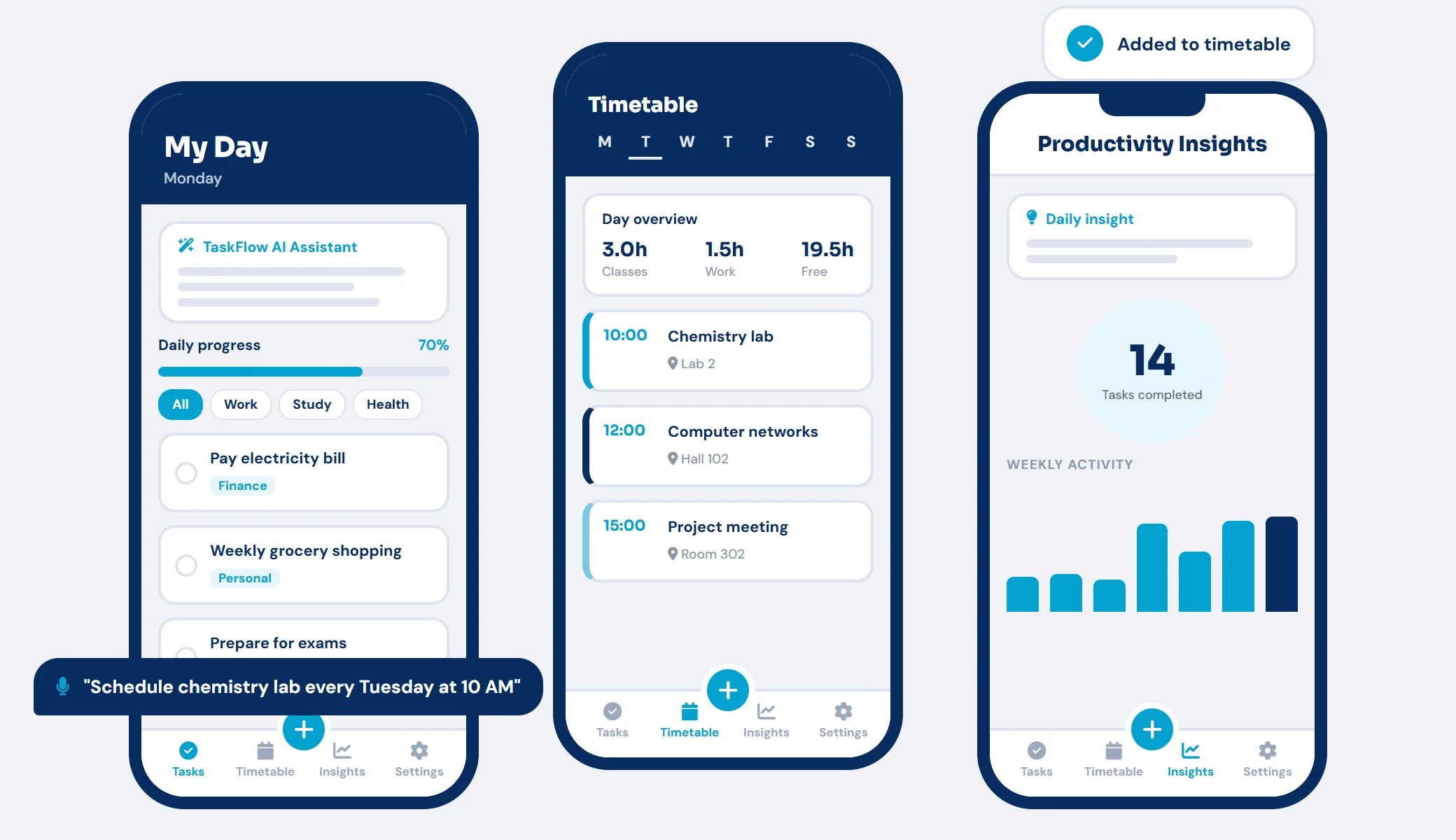
We designed and built TaskFlow for a productivity app startup. People speak or type their plans, and the app's AI turns them into tasks, reminders and a weekly timetable.
- Client
- A productivity app startup
- Platform
- iPhone and iPad, iOS 13 or later
- Category
- Productivity
- Stack
- Swift, Gemini and OpenAI
- Our role
- Design, build and App Store release
- 4main screens: tasks, timetable, insights and settings
- 2AI models behind the planner: Gemini and OpenAI
- 2ways to use it: free with ads, or Premium
- 0user data collected, per the App Store privacy label
A planner that does the planning
Most planner apps make people fill in forms. The goal was an app where you just say what you need to do.
-
01
Plan in plain language
Users speak or type a sentence, and the AI fills in the task, day, time and repeat on its own.
-
02
Fit real study and work weeks
A weekly timetable for classes, meetings and routines, with conflict detection so nothing is double-booked.
-
03
Never miss a task
Sub-tasks, priority labels, flexible repeats and local notifications that keep working in the background.
-
04
Free to use, with a paid upgrade
Every planning tool is free. AI chats are topped up by watching a short ad, or unlimited with Premium.
-
05
Private by design
AI chat history stays on the device, and users can delete their data at any time.
From a sentence to a schedule
No forms to fill. One sentence becomes a structured task in the right place.
-
Step 1
Speak or type
"Schedule chemistry lab every Tuesday at 10 AM."
-
Step 2
AI understands it
Gemini or OpenAI pulls out the task, the day, the time and how often it repeats.
-
Step 3
Added automatically
The class lands in the timetable, with a reminder, ready to edit if needed.
The screens people use every day
A weekly timetable that catches clashes
Classes, lectures, meetings and routines sit in a day-by-day view with a summary of scheduled and free hours. Smart conflict detection flags anything that overlaps.
- Day overview
- Conflict detection
- Room and teacher details
Tasks with everything a real to-do needs
Each task can have sub-tasks, a priority label and a category. Repeats can be daily, weekly or on custom days, and reminders arrive as local notifications.
- Sub-tasks and priorities
- Flexible repeats
- Local notifications
Insights and a look you can make your own
An insights screen shows tasks completed and weekly activity, with a daily AI briefing. Users pick dark or light mode, an accent colour and a font, and can turn on AI voice replies.
- Completion trends
- Dark and light modes
- AI voice
Free for everyone, Premium for power users
The app had to be useful for free and still earn money, so we built both paths.
Free
- Every task and timetable tool
- AI chats earned by watching a short video
- 3 AI chat credits for each ad watched
Premium
- No ads at all
- Unlimited AI chats
- Priority assistant responses
Built to respect the user
A planner holds personal routines, so privacy and accessibility were part of the build from the start.
-
Chats stay on the device
AI chat history is stored locally, not on a server.
-
Delete at any time
Users stay in control and can clear their data whenever they want.
-
No data collected
The App Store privacy label states the developer collects no data from the app.
-
Accessible
Supports larger text and a dark interface on iOS.
From Done Desk to TaskFlow
The latest release turned the app into a new brand and made it faster and easier to keep up to date.
-
01
A new identity
Done Desk became TaskFlow, with a new icon, visual design and interface.
-
02
Ad-based free AI chats
Strict trial limits were replaced by rewarded ads that top up AI chat credits.
-
03
Always on the latest version
A force-update system keeps every user on the newest and most secure release.
-
04
Faster, steadier app
More reliable background reminders and quicker Gemini and OpenAI task extraction.
The technology behind TaskFlow
A native Swift app with two AI models behind the planner.
-
App
 SwiftNative iPhone and iPad app.
-
AI
Gemini and OpenAITurn plain sentences into tasks and timetable entries.
-
Reminders
Local notificationsTask and class reminders, even in the background.
-
Revenue
In-app purchases and rewarded adsPremium upgrade and ad-based AI credits.
What Safforix did
We took TaskFlow from first screen to the App Store, and we keep shipping updates.
Have an app idea with AI in it?
Tell us what you want your app to do. We'll reply with questions or a first estimate.